Behavior Agent User Guide
Use this guide when you want Annolid to run typed behavior-agent analysis with replayable artifacts, especially for aggression bout scoring from counted sub-events.
What this feature does
The behavior-agent flow:
- infers or accepts an assay context,
- reads track/perception artifacts,
- segments behavior intervals,
- aggregates aggression bout counts from sub-events,
- writes an immutable run manifest and artifacts.
The run output is designed for reproducibility and review, not just one-off chat responses.
Supported aggression sub-events
Aggression bout aggregation uses canonical counted sub-events:
slap_in_facerun_awayfight_initiation
Common aliases (for example slap in the face) are normalized automatically.
Option A: CLI workflow (annolid-run agent-behavior)
Basic command:
annolid-run agent-behavior \
  --video /path/to/video.mp4 \
  --results-dir /path/to/results \
  --run-id run_001 \
  --context-prompt "analyze aggression bouts" \
  --default-assay aggression
If you already have replayable perception artifacts, pass them directly:
annolid-run agent-behavior \
  --video /path/to/video.mp4 \
  --results-dir /path/to/results \
  --artifacts-ndjson /path/to/artifacts.ndjson \
  --run-id run_002 \
  --default-assay aggression \
  --bout-frame-gap 20
Useful flags
--artifacts-ndjson: replays typedTrackArtifactinput instead of live perception.--bout-frame-gap: frame-gap threshold used to group sub-events into bouts.--no-memory: skip memory record writes.--no-analysis: skip analysis code/metrics stage.--fail-on-validation-error: return non-zero exit when bout validation fails.
CLI output summary
The command prints JSON with fields including:
manifest_pathepisode_idtask_plan_assayartifact_countsegment_countvalidation_errorsbout_counts
Option B: Annolid Bot workflow (GUI)
In the GUI chat dock, ask Annolid Bot to score aggression bouts for the current video or a specific path.
Example prompt:
Score aggression bouts for /path/to/video.mp4 using counted sub-events.
Use run id run_gui_001 and frame gap 20.
The bot uses the typed gui_score_aggression_bouts tool and returns a summary
including the immutable manifest location.
Force a specific behavior-analysis skill
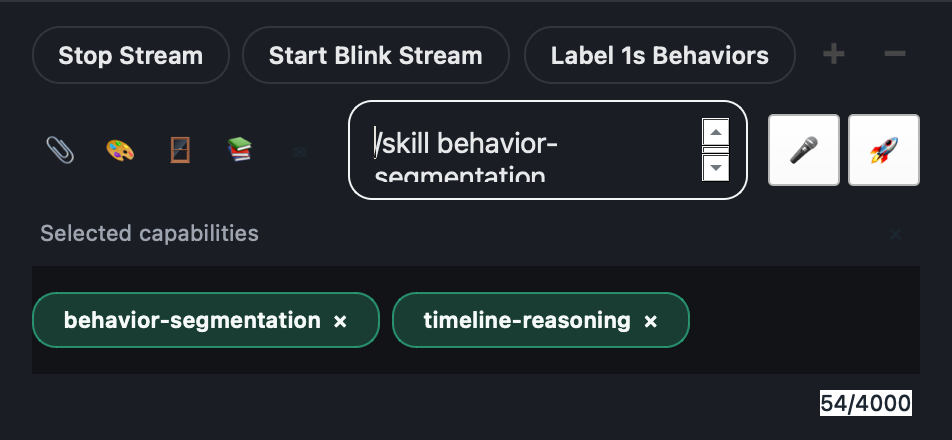
If you want to steer the bot more explicitly, use the normal Annolid chat skill selection syntax before your prompt text.
Examples:
/skill behavior-assay-taxonomy
Infer the assay type for the current video and explain the evidence.
/skill behavior-segmentation
/skill timeline-reasoning
Segment aggression bouts from the current run artifacts and explain why nearby sub-events were merged.
/skill scientific-reporting
/skill provenance
Write a concise behavior-analysis report with manifest and artifact references.
Use explicit skill selection when you want predictable bot behavior for assay inference, segmentation, derived metrics, or report writing.
Behavior-analysis bot skills
Annolid Bot now exposes builtin behavior-analysis skills that can be selected explicitly or auto-suggested from the task text. These skills reuse the standard Annolid skill loader and subagent runtime; they are not a separate plugin system.
Examples include:
behavior-assay-taxonomybehavior-feature-selectionperception-routingbehavior-segmentationtimeline-reasoningsandboxed-analysispolygon-classifier-trainingbehavior-evaluationscientific-reportingprovenance
These skills are used by the specialized behavior subagents for assay inference, feature planning, routing, segmentation, polygon classifier training/evaluation, analysis coding, and reporting.
The Agent Capabilities dialog (/capabilities) also includes behavior presets
for:
- assay inference,
- aggression segmentation,
- polygon classifier training and reporting,
- scientific reporting.
Each preset sets a focused task hint and refreshes suggested skills.
Output layout
Each run is immutable and written under:
<results-dir>/analysis_runs/<run-id>/
Key files:
manifest.jsonartifacts/tracks.ndjsonartifacts/behaviors.ndjsonartifacts/memory.ndjsonartifacts/metrics.ndjsonartifacts/metrics.parquet(optional)artifacts/analysis.py(when analysis is enabled)artifacts/report.mdandartifacts/report.html(when reporting is enabled)artifacts/evidence.ndjson(when evidence rows are emitted)
Validation behavior
Bout validation is intentionally focused on aggression bout count rows. Typical validation checks include canonical event codes and non-negative counts.
If validation fails:
- the summary includes
validation_errors, - and with
--fail-on-validation-error, the CLI exits with code1.
Recommended operating pattern
- Start with a short clip and deterministic
--run-id. - Verify
manifest.jsonandartifacts/behaviors.ndjson. - Check
bout_countsin CLI/Bot response. - Scale to full videos once schema and counts look correct.