Annolid Agent and annolid-run
Use this guide when you want Annolid Bot or other Annolid agent surfaces to drive
CLI workflows through annolid-run.
What This Enables
Annolid agents can now invoke annolid-run through a typed annolid_run tool
instead of falling back to generic shell execution.
That gives you:
- structured argument handling,
- captured
stdoutandstderr, - workspace-aware working directory resolution,
- safer defaults for mutating commands.
Recommended Usage
Use read-only commands directly when you want status, discovery, or inspection.
Examples:
annolid-run agent-status
annolid-run agent-onboard
annolid-run agent-onboard --dry-run
annolid-run agent-onboard --update
annolid-run agent-onboard --prune-bootstrap
annolid-run list-models
annolid-run help train
annolid-run help train dino_kpseg
annolid-run help predict dino_kpseg
annolid-run update check --channel stable
annolid-run agent memory inspect --workspace /path/to/workspace
These commands route through the dedicated tool path and return the captured CLI output back into chat.
Safety Model
The annolid_run tool blocks mutating commands unless allow_mutation=true is
set explicitly.
Examples of commands that may mutate state:
annolid-run update runannolid-run update rollback --previous-version 1.0.0annolid-run agent memory flushannolid-run agent skills refreshannolid-run train <model> ...annolid-run predict <model> ...
Direct chat commands such as:
annolid-run update run
do not auto-opt into mutation. They fail closed and instruct the caller to use the typed tool path intentionally.
Tool Contract
The annolid_run tool accepts:
command: string form of the CLI commandargv: optional explicit argument listworking_dir: optional path resolved inside allowed rootsallow_mutation: explicit opt-in for mutating commands
Typical typed invocation shape:
{
  "command": "annolid-run update check --channel stable",
  "working_dir": "/Users/you/project",
  "allow_mutation": false
}
Good Patterns
- Prefer
annolid-runfor Annolid-native CLI actions instead of raw shell. - Use
annolid-run help <command>for command-level guidance andannolid-run help train <model>orannolid-run help predict <model>for model-specific flags. - Use explicit workspaces for agent memory, secrets, eval, and skills commands.
- Start with read-only inspection commands before any
train,predict,refresh, orapplyaction. - Keep GUI-driven direct commands for discovery and status; reserve typed mutation for deliberate automation.
Workspace Onboarding and Template Updates
Use agent-onboard to initialize or synchronize workspace bootstrap files under
~/.annolid/workspace (or a custom --workspace path).
Recommended flow:
annolid-run agent-onboard --dry-run
annolid-run agent-onboard
annolid-run agent-onboard --update
--dry-run: preview file actions without writing.--update: overwrite changed template files with current versions.--overwrite: legacy alias for--update.--no-backup: when used with--update, skip backup copies.--backup-dir <path>: write overwritten-file backups to a custom directory.--prune-bootstrap: remove stale bootstrap-managed files no longer present in current template set.
By default, update mode creates backup copies in:
<workspace>/.annolid/bootstrap-backups/<timestamp>/
This keeps user-modified files recoverable while allowing template updates.
GUI workflow:
- Open
Settings -> Agent Workspace Onboarding… - Select a workspace path (defaults to
~/.annolid/workspace), then Preview and Apply. - The dialog now shows a step guide/progress bar, color-coded action statuses, and workspace-health guidance.
- Use
Open Workspace Folderto inspect files directly, andRestore Latest Backupfor rollback.
Onboarding/status payloads now include structured workspace-health fields:
workspace_health_before/workspace_health_afterinagent-onboardworkspace_healthinagent-statustemplate_missing_count,template_missing, andguidancefor quick diagnosis and safer updates.
Tool Pool and Permissions
Use agent-tool-pool to inspect effective tool registration and policy gating:
annolid-run agent-tool-pool
annolid-run agent-tool-pool --provider ollama --model qwen3
annolid-run agent-tool-pool --workspace ~/.annolid/workspace
The output includes:
- registered tools (pre-policy),
- allowed and denied tool lists (post-policy),
- resolved policy profile/source,
- a compact permission context (
deny_names,deny_prefixes) for runtime checks.
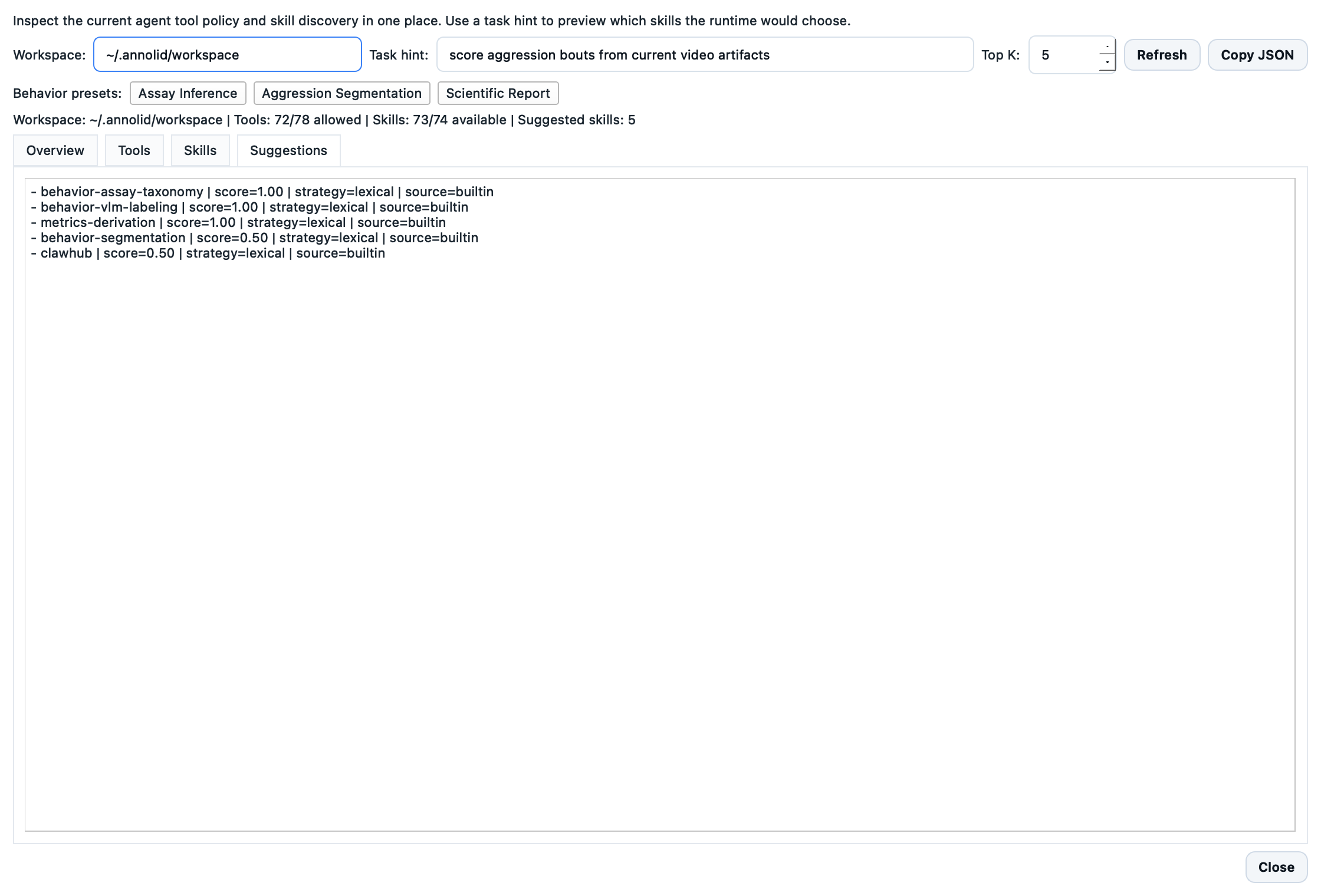
The GUI also exposes the same data in the Agent Capabilities panel, reachable from the main app menu and the workspace onboarding dialog. It includes tabs for overview, tools, skills, and task-based suggestions.
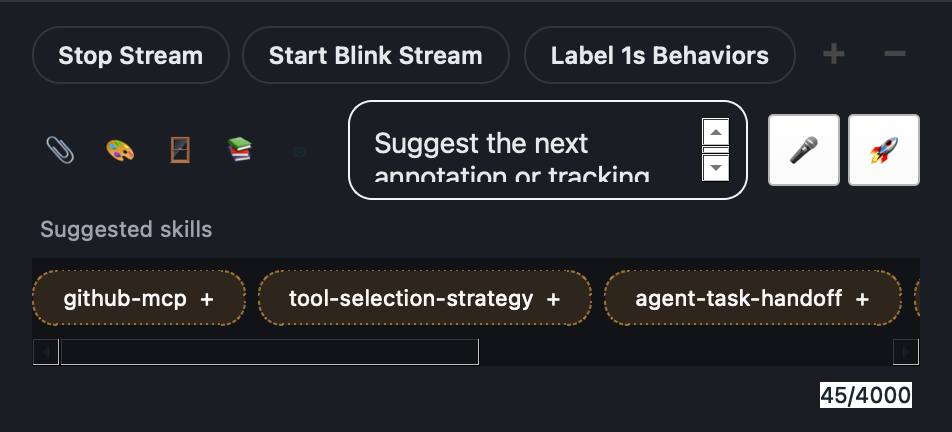
The chat composer also supports slash-driven selection:
- type
/or@to open a picker for skills, tools, and direct commands, - choose
/skillor/toolto bias the next turn with explicit selections, - use
/capabilitiesor/capsto open the combined capabilities panel, - inline quick-suggestion chips appear under the composer as you type,
- selected skills and tools appear as removable chips under the composer,
- skill chips use a distinct highlight from tool chips, and suggested skills use a dashed style,
- keyboard shortcuts:
Ctrl+Alt+Leftfocuses selected chips,Ctrl+Alt+Rightfocuses suggested skills,Ctrl+Alt+Backspaceclears all selections, - when a chip is focused,
BackspaceorDeleteremoves a selected chip,EnterorSpaceactivates a suggested skill, andEscreturns focus to the prompt, - selected chips can be reordered by dragging one chip onto another,
- the composer header shows a compact active-capabilities summary pill,
- keep selection lines on their own line above the natural-language request.
Examples:
/skill weather
Check today's weather

/tool cron
Schedule an email summary for tomorrow morning
Use agent-capabilities when you want both tool policy and skill discovery in one report:
annolid-run agent-capabilities
annolid-run agent-capabilities --workspace ~/.annolid/workspace --task-hint "check today's weather"
annolid-run agent-capabilities --provider ollama --model qwen3 --task-hint "summarize weather and email report"
The output includes:
tool_poolwith the registered/allowed/denied tool view,skill_poolwith skill discovery and suggestions,- a compact
summaryblock for quick inspection.
Use agent-skill-pool to inspect effective skill discovery and optional scored task matches:
annolid-run agent-skill-pool
annolid-run agent-skill-pool --workspace ~/.annolid/workspace --task-hint "summarize weather and email report"
annolid-run agent-skill-pool --task-hint "debug python traceback" --top-k 3
The output includes:
- skill counts (
total,available,unavailable,always), - source distribution (
workspace,managed,builtin,extra:*), - unavailable skill reasons preview,
- scored
suggested_skills(name,score,strategy,source) when--task-hintis provided.
Runtime Turn Snapshots
Agent turns now persist lightweight diagnostic snapshots under:
<sessions_dir>/snapshots/<encoded-session-id>.jsonl
Each snapshot records model/provider, stop reason, iteration/tool counts, bottleneck timing, and a short final-output preview to speed up debugging without parsing full logs. Snapshots also include:
tool_usage_counts(per-tool call counts),context_compaction.runsandcontext_compaction.messages_trimmed(history compaction telemetry).
Inspect snapshots from CLI:
annolid-run agent-turn-snapshots --session-id email:user@example.com
annolid-run agent-turn-snapshots --session-id email:user@example.com --limit 50
annolid-run agent-turn-snapshots --workspace ~/.annolid/workspace --session-id gui:annolid_bot:default
Prompt Compaction
The GUI system prompt keeps a compact runtime tooling section by listing a fixed-size preview of available tool names and summarizing any remainder count. This keeps prompts stable when large tool registries are active.
Help Patterns
The CLI and agent tool normalize these help forms to the same underlying behavior:
annolid-run help
annolid-run help train
annolid-run help predict
annolid-run help train dino_kpseg
annolid-run help predict dino_kpseg
Use the command-level help form first, then switch to the model-specific help form when you need plugin arguments and examples.
Built-in model plugins now expose curated help groups such as Required inputs,
Model and runtime, and Inference controls, so annolid-run help train <model>
and annolid-run help predict <model> are easier to scan before the full flag
list.